
Last Updated: March 21, 2025
This article is reviewed annually to reflect the latest market regulations and trends.

“Beware of little expenses. A small leak will sink a great ship.”
— Benjamin Franklin
Withdrawing via ACY Client Portal Matters
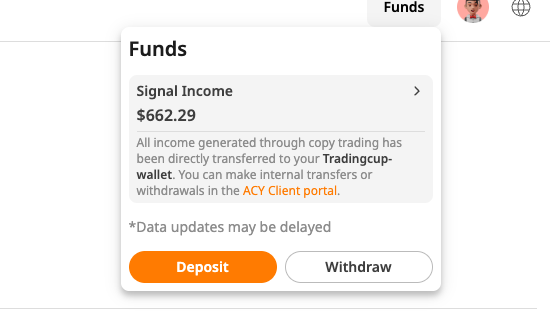
Tradingcup partners with ACY Securities, a globally regulated broker, to handle deposits and withdrawals securely. But here’s what new users often miss: ACY’s withdrawal rules differ from other platforms.
For example, you get 3 free withdrawals monthly but exceeding these costs $25 per transaction.
This guide clarifies how to cash out your Tradingcup profits seamlessly through ACY’s portal, avoiding fees and delays.
Step-by-Step: How to Withdraw Money from Tradingcup via ACY
Step 1: Log Into the ACY Client Portal
- Go to ACY Client Portal → Use your Tradingcup credentials.
- Pro Tip: Complete ACY’s KYC verification upfront (ID + address proof).
Step 2: Navigate to Withdrawals
- Click Cash Management → Select Withdraw Funds.
Step 3: Choose Your Withdrawal Method
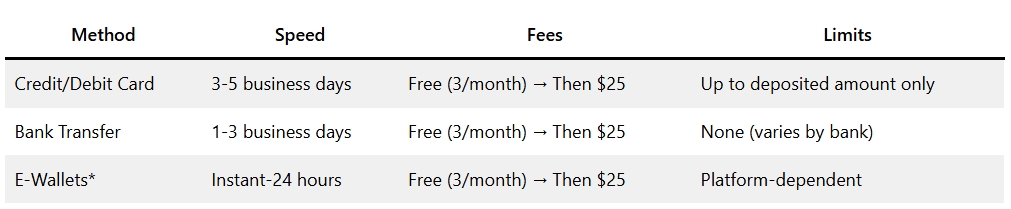
Note: E-wallets include Skrill, Neteller, and others (check ACY’s Deposit/Withdrawal Methods).
Step 4: Enter Withdrawal Amount
- Minimum Withdrawal: None (but your bank/e-wallet may impose limits).
- Credit Card Rule: You can only withdraw up to the amount you deposited via that card.
Step 5: Submit & Track Your Request
- Requests before 4:00 PM AEST are processed same-day (weekdays only).
- Track status under Transaction History.
📌 Pro Tip: How Tradingcup Works (Full Guide)
Tradingcup (via ACY) Withdrawal Fees vs Competitors
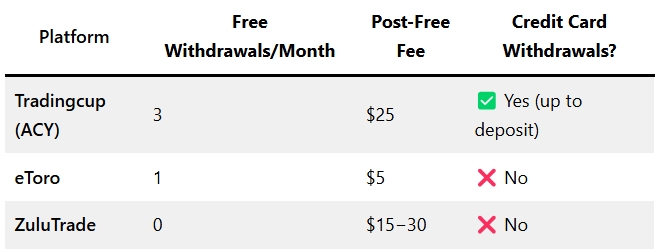
Key Takeaway: ACY offers more free withdrawals than most competitors but restricts credit card cashouts to deposited amounts.
📌 Quick Read about our comparison: Tradingcup vs Other Platforms
Fix Common ACY Withdrawal Issues
❌ “Why is my withdrawal taking so long?”
- Cause: Submitted after 4:00 PM AEST or weekend/holiday delays.
- Fix: Resubmit before cutoff on a weekday.
❌ “My credit card withdrawal failed!”
- Cause: Requested amount exceeds your card’s deposited total.
- Fix: Withdraw via bank transfer or e-wallet instead.
❌ “I’m being charged $25—why?”
- Cause: You’ve exceeded 3 free monthly withdrawals.
- Fix: Wait for the next calendar month or split withdrawals.
📌 Quick useful read: Top 10 Copy Trading Mistakes
FAQs: ACY Withdrawal Rules Explained
❓ Can I withdraw to a different card than I deposited with?
- No. ACY only allows withdrawals to the original payment method.
❓ Are there deposit fees?
- Bank transfers: Free (but your bank may charge international fees).
- Credit cards: No fees from ACY, but check with your card issuer.
❓ How do I contact ACY support?
- Use live chat on their portal or email support@acy.com.
📌Pro Tip: Copy Trading Risk Management

Pro Tips for Hassle-Free Withdrawals
- Plan Ahead: Use your 3 free withdrawals strategically.
- Credit Card Hack: Deposit small amounts via card if you need quick withdrawals.
- Avoid Weekends: Submit requests before Friday 4:00 PM AEST.
For more detailed insights on developing daily trading routines, risk management, and effective position sizing strategies, explore additional articles on Trading Cup. Our trading experts at ACY and FinLogix are also great resources to guide your journey towards trading excellence.

Discover Our Best Trading Signals
At Tradingcup, you can browse through a selection of signals and review past performance before you decide to copy.
Become A Signal Provider
Share your expertise and become a signal provider so other traders can copy your trades.
Stay tuned to our blog for more trader spotlights and leaderboard updates.
Trading involves risks.
Visit the Tradingcup blog through the link below for more updates: https://www.tradingcup.com/learn
For further reading, visit acy.com